The Ultimate Instagram Safety, Scam Prevention & Account Security Guide (2026)
Audience: Instagram Users, Students, Parents, Content Creators, Online Shoppers & Small Business Owners
Reading Time: ~28 minutes
Editorial Review: Tenzed Cyber Intelligence Team • Aligned with CERT-In, I4C 1930 & Meta Safety Center
Last Updated: November 2026
Languages: English • हिन्दी (Hindi) • ગુજરાતી (Gujarati)
Quick Emergency Actions
If you are experiencing an active security incident right now:
- Financial Fraud (UPI / Bank Deduction): Immediately call 1930 (National Cyber Crime Helpline, India, 24/7) within the Golden Hour (first 1–2 hours) to freeze the fraudster's recipient account. File a complaint on cybercrime.gov.in.
- Account Takeover / Hacked Profile: Open instagram.com/hacked in your phone browser to initiate identity verification and biometric video selfie recovery.
- Email Changed Alert: Check your email for an alert from
security@mail.instagram.comand tap "Secure my account" or "Revert this change".
Table of Contents
- Anatomy of Instagram Fraud & Social Engineering
- Encyclopedia of 24 Instagram Scams
- Visual Security Flowcharts & Decision Trees
- Step-by-Step Account Hardening Guide
- Instagram Privacy Settings & Teen Account Safety
- How to Identify Fake Instagram Profiles
- What to Do If Your Account Is Hacked
- Sextortion & Blackmail Emergency Support
- What to Do If You Lose Money Through Fraud
- Audience-Specific Safety Playbooks
- Instagram Business Account & Meta Business Suite Security
- Downloadable & Interactive 10-Point Security Checklist
- Frequently Asked Questions (FAQ)
- Verified Official Portals & Helplines
- About Tenzed Technologies Enterprise Security
1. Anatomy of Instagram Fraud & Social Engineering
With over 2 billion active users, Instagram has transformed into a dominant global marketplace, media network, and communications backbone. However, this scale has also attracted sophisticated, organized cybercrime syndicates.
Why Scammers Target Instagram
- Pre-Established Trust Networks: Users naturally trust messages coming from familiar faces, followers, or mutual connections.
- Visual Appeal & Social Proof: High follower counts, polished aesthetic imagery, and fake comment threads can be fabricated or bought for pennies, creating an illusion of legitimacy.
- In-App Commerce Friction Reduction: The rapid growth of Instagram shopping and direct-to-consumer sales conditions users to make quick purchasing decisions via Direct Messages (DMs) or external links.
The Psychology of Social Engineering
Modern attacks rarely exploit technical vulnerabilities in Meta's core servers. Instead, they exploit cognitive biases:
- Urgency & Panic: "Your account will be permanently banned in 12 hours unless you appeal."
- Greed & Excitement: "You have won a free iPhone 16 Pro or ₹50,000 cash grant."
- Sympathy & Obligation: "I am stranded in an emergency and need a quick ₹2,000 transfer."
- Authority Impersonation: Pretending to be official Meta support, copyright agents, or police officials.
2. Encyclopedia of 24 Instagram Scams
1. Fake Instagram Profile Scams (Bot Swarms)
- How It Works: Scammers scrape photos and bios from real profiles, create lookalike handles with extra underscores or subtle character swaps, and spam follower lists.
- Scenario: You receive a follow request and DM from an account using your friend's exact photos: "Hey! My old handle was locked out, add my new account." Within hours, they ask for a ₹2,000 emergency loan.
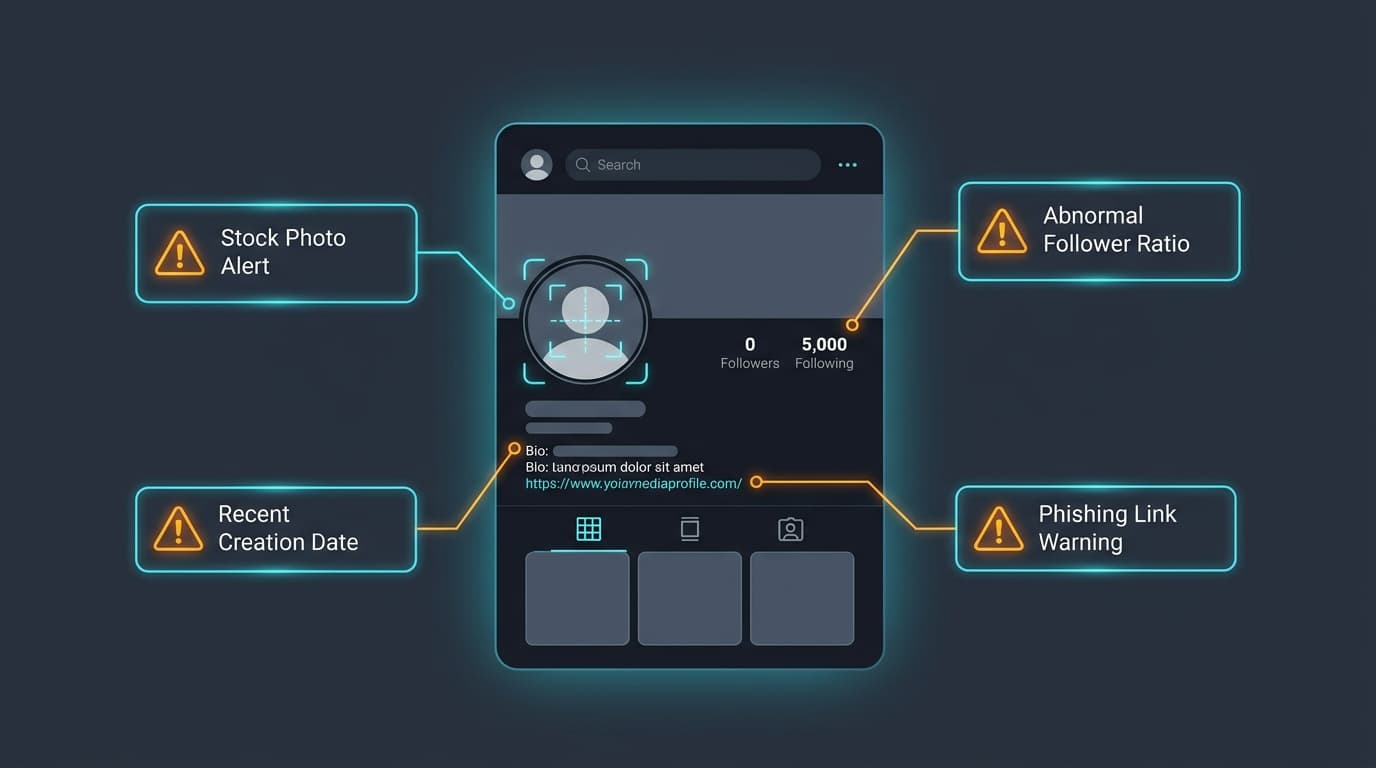
- Red Flags: Very recently created account; follows thousands but has few followers; bio contains suspicious shortened URLs.
- Identification: Tap
...-> "About this account" to check former usernames and creation dates. Call your friend on phone to verify. - Prevention: Never accept duplicate accounts of existing friends without external verification.
- Remediation: Report profile as "Pretending to be someone I know" and alert mutual friends on Stories.
2. Account Impersonation & Clone Attacks
- How It Works: Threat actors clone reputable local businesses, artists, or doctors, copying their posts to sell counterfeit goods or solicit advance payments.
- Scenario: A boutique bakery finds
@thesweetoven_mumbai_officialoffering 60% off cakes if paid via private UPI immediately. - Red Flags: Demands for direct UPI/wire transfers; disabled comments; sudden follower count disparity.
- Identification: Compare post timestamps and check if the business has a verified official domain.
- Prevention: Keep personal profiles private; watermark original business photography.
- Remediation: Submit an official Meta Impersonation Report with government photo ID.
3. Instagram Account Hacking (Credential Stuffing & Session Hijacking)
- How It Works: Hackers take credentials leaked in third-party database breaches and use automated scripts to test them against Instagram accounts.
- Scenario: An old password leaked from a fitness site is reused on Instagram. At 3:00 AM, an automated script logs in, changes the recovery email, and binds 2FA to a foreign phone number.
- Red Flags: Unexpected email from
security@mail.instagram.com; sudden session termination across all devices. - Identification: Inspect active sessions in Meta Accounts Center -> Password & Security.
- Prevention: Use unique 16+ character passphrases stored in a password manager.
- Remediation: Tap "Secure my account" in the security email or open instagram.com/hacked.
4. OTP & "Help Me Vote" Scams
- How It Works: Scammers hijack a mutual friend's profile and ask you to forward a 6-digit SMS code to help them "vote in an ambassador contest." In reality, the code is your own password reset OTP.
- Scenario: A message from a cousin says: "I need 10 votes to win a photography contest. You'll get an SMS code, please send it to me!" You send the code and lose access instantly.
- Red Flags: Any request to share an SMS code; text explicitly stating "Do not share this code"; artificial urgency.
- Identification: Read the SMS body. If it mentions "Instagram password reset", it is YOUR access token.
- Prevention: Never share numeric verification codes with anyone under any pretext.
- Remediation: If shared, immediately change password and tap "Log out of all other sessions".
5. Phishing Links & Spoofed Portals
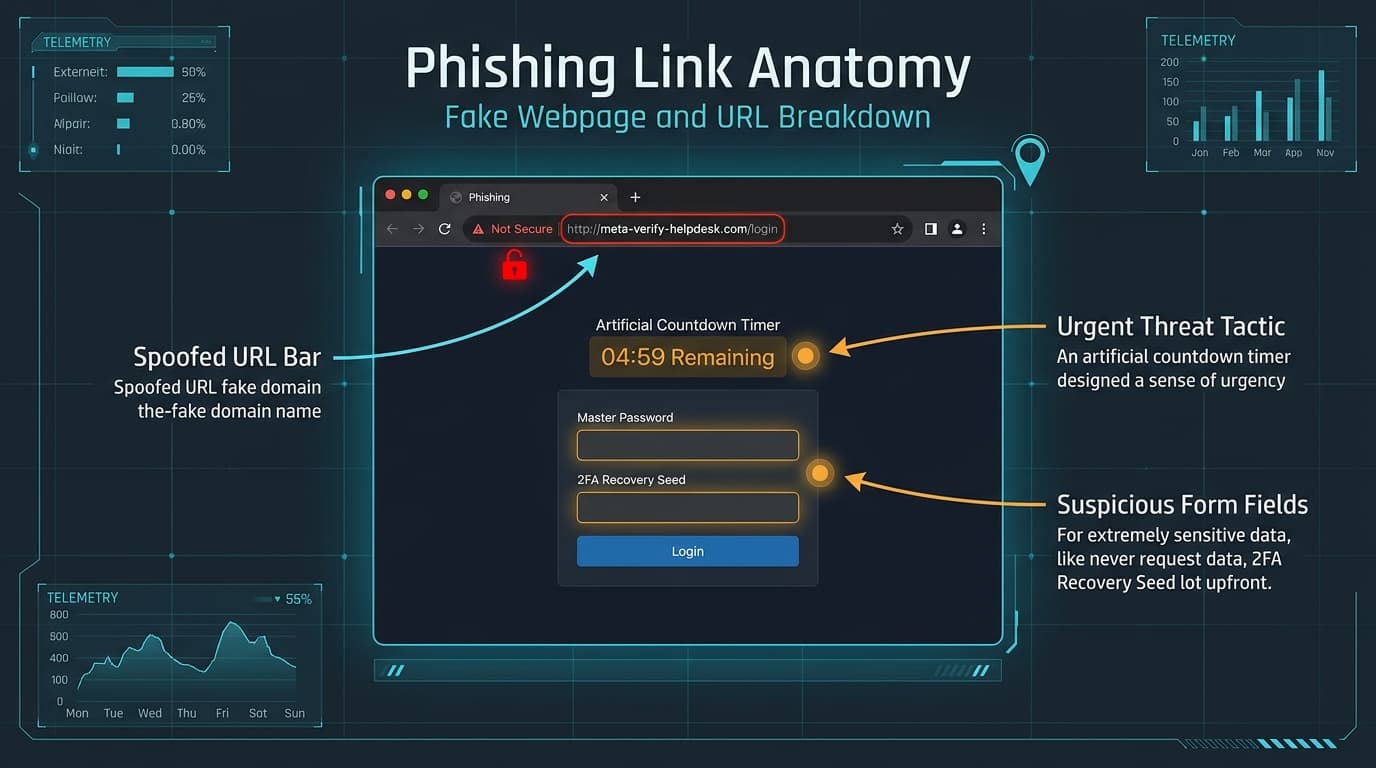
- How It Works: Victims receive links leading to counterfeit login pages hosted on lookalike domains (
meta-verify-help.online). - Scenario: A DM announces: "Your account is eligible for the $1,000 Meta Creator Grant. Claim here." The page looks identical to Instagram.
- Red Flags: Browser URL does not end in
instagram.com; page asks for password and backup codes together. - Identification: Always inspect the address bar for the exact domain
https://www.instagram.com/. - Prevention: Never click login links in direct messages or emails.
- Remediation: Immediately reset password, terminate sessions, and scan device for keyloggers.
6. Fake Verification Badge (Blue Tick) Scams
- How It Works: DMs claim your account qualifies for an official blue verification tick, prompting you to fill out a phishing form.
- Scenario:
@meta_badge_councilmessages: "Your profile qualifies for free Meta Verification. Fill out the application atmeta-badge-portal.orgin 24 hours." - Red Flags: Meta never handles verification via DMs; form asks for current account password.
- Identification: Meta Verified is managed solely inside the official app (
Settings -> Accounts Center -> Meta Verified). - Prevention: Never enter credentials on external badge request websites.
- Remediation: Change credentials immediately and revoke third-party app tokens.
7. Fake Copyright Infringement & DMCA Warnings
- How It Works: Intimidating messages claim your posts violate copyright law and threaten permanent deletion unless an appeal is filed on an external portal.
- Scenario: "Copyright Infringement Notice: Case #8129. Appeal within 24 hours at
instagram-dmca-appeals.comor your profile will be disabled." - Red Flags: Sent via DM instead of official Support Inbox; sent by a regular user account with a Meta logo.
- Identification: Check in-app status under
Settings -> Help -> Support Requests -> Violations. - Prevention: Disregard all DM copyright warnings. Official notices appear in the Support Inbox.
- Remediation: If credentials were typed, immediately change your password and enable 2FA.
8. Fake Meta Support & Community Guidelines Threats
- How It Works: Profiles posing as Meta Staff threaten bans for alleged community guideline breaches (nudity, hate speech).
- Scenario: "Meta Safety Advisory: Your profile has been flagged. Confirm your identity within 12 hours or account will be terminated."
- Red Flags: Countdown timers; non-official handles like
@help_support_security_meta_01. - Identification: Check
Settings -> Account Status. If all is green, the message is fraudulent. - Prevention: Block and report the sender profile immediately.
- Remediation: Rely exclusively on the in-app Account Status dashboard.
9. Giveaway & Lottery Scams
- How It Works: Mass tags claiming you won an iPhone or cash, requiring advance payment for courier or customs fees.
- Scenario: Tagged in a post: "Congratulations! You won an iPhone 16! DM us to claim." In DMs, they ask for ₹850 shipping via PhonePe.
- Red Flags: Winning contests you never entered; paying money upfront to receive a prize; personal UPI ID payment.
- Identification: Authentic brands never charge winners shipping or customs fees.
- Prevention: Restrict tag and mention privacy settings to "Only people you follow".
- Remediation: Block profile, report comment for spam, and never transfer money.
10. Fake E-Commerce & Fraudulent Instagram Shops
- How It Works: Sponsored ads offering luxury fashion or gadgets at 80–90% discounts with advance UPI/card payment only. No items are ever shipped.
- Scenario: Nike shoes advertised for ₹1,299 instead of ₹12,000. Buyer pays via PhonePe and is immediately blocked.
- Red Flags: Unbelievably low prices; no Cash-on-Delivery (COD); comments disabled; no physical address or GSTIN.
- Identification: Check domain registration age via WHOIS and search Google for "[Brand name] scam".
- Prevention: Stick to Cash-on-Delivery (COD) for unfamiliar social stores.
- Remediation: If paid via UPI, call 1930 within the Golden Hour and file a bank dispute.
11. Cryptocurrency & "Pig-Butchering" Investment Fraud
- How It Works: Scammers display luxury lifestyles and fabricated profit charts, claiming algorithmic trading yields guaranteed 500% returns in hours.
- Scenario: A hacked friend's story reads: "I earned ₹95,000 trading crypto with Dr. Priya! DM her." You deposit ₹10,000, see a fake ₹80,000 balance, but are asked for ₹25,000 "tax" to withdraw.
- Red Flags: Guaranteed high returns with zero risk; transferring money to individual bank accounts or crypto wallets.
- Identification: Unregistered investment advice is illegal under SEBI/SEC regulations.
- Prevention: Never invest money based on advice from social media DMs or Telegram groups.
- Remediation: Stop sending funds immediately. File a complaint on cybercrime.gov.in.
12. Part-Time "Like Reels & Earn" Task Fraud
- How It Works: Unsolicited messages offering ₹3,000/day for liking Instagram reels. Small initial payouts build trust before demanding large sums for "VIP prepaid tasks".
- Scenario: You are paid ₹300 via UPI for liking 3 reels. You are then moved to Telegram and convinced to invest ₹20,000 for an ₹32,000 payout. Once you transfer ₹1,00,000, your funds are frozen.
- Red Flags: Disproportionately high pay for simple likes; moving chats to Telegram; depositing money to earn money.
- Identification: Real employers never require staff to deposit money to receive their salary.
- Prevention: Block accounts offering daily earnings for liking reels or leaving reviews.
- Remediation: Call 1930 immediately to freeze the recipient bank account.
13. Work-From-Home & Fake Casting Scams
- How It Works: Scammers pose as casting agents offering modeling contracts, demanding portfolio fees or intimate photos as "auditions".
- Scenario: "We love your look for our Autumn line! ₹30,000/day. Pay ₹2,000 registration fee and send bikini photos for measurements."
- Red Flags: Scouting via DMs without agency representation; upfront fees; requesting provocative imagery.
- Identification: Reputable modeling agencies never charge audition fees or request intimate photos over DMs.
- Prevention: Independently verify agencies and involve guardians if under 21.
- Remediation: Cease contact immediately and follow the sextortion defense guidelines if imagery was sent.
14. UPI "Accidental Transfer" & Fake Screenshot Scams
- How It Works: A scammer sends a forged Google Pay screenshot claiming they accidentally sent you ₹20,000 and begs for an immediate refund.
- Scenario: A caller cries: "My father is in the hospital and I sent ₹20,000 to your number by mistake! Here is the screenshot. Please refund it immediately!" Your bank account balance hasn't changed.
- Red Flags: Panicked pleading before you can check your bank statement; fake SMS from a 10-digit number.
- Identification: Always open your official mobile banking app to verify the actual transaction statement.
- Prevention: If money is not reflected in your bank statement, no money was received.
- Remediation: Instruct the caller to file an official inter-bank reversal request through their bank branch.
15. QR Code & Reverse Payment Fraud
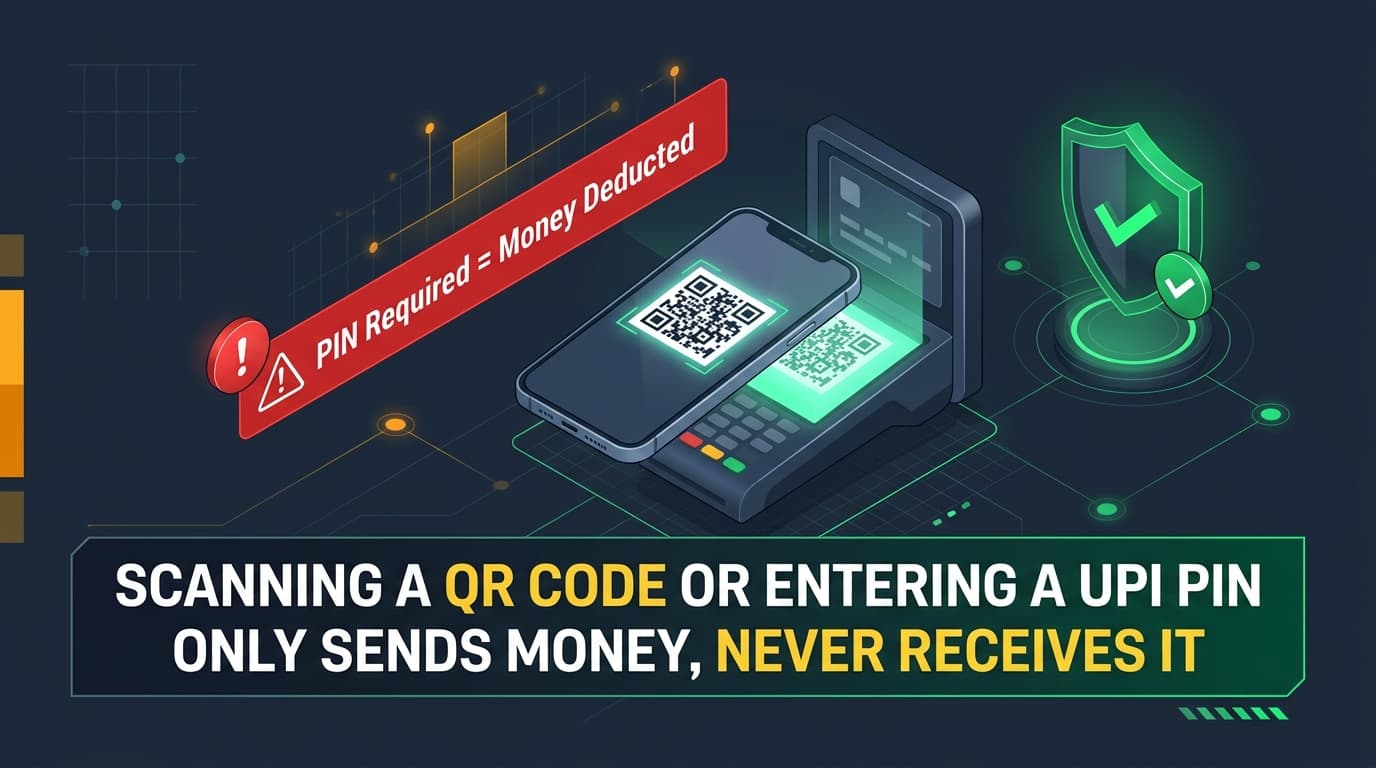
- How It Works: When selling goods on Instagram, a buyer sends a QR code: "Scan this on PhonePe and enter your PIN to receive the money."
- Scenario: You list an item for ₹4,000. The buyer sends a QR code. You scan it, enter your 6-digit PIN, and ₹4,000 is debited from your account.
- Red Flags: Being instructed to scan a QR code to receive funds; entering a UPI PIN during an incoming transaction.
- Identification: UPI Architectural Rule: You NEVER enter a PIN to receive money. PIN is exclusively for authorizing debits.
- Prevention: Never scan a QR code or enter a PIN to receive payments. Share only your UPI ID.
- Remediation: Call 1930 immediately and block your UPI profile in your banking app.
16. Romance Catfishing & Matrimonial Fraud
- How It Works: Profiles using stolen photos of pilots, military personnel, or doctors spend months grooming victims romantically before faking emergencies.
- Scenario: An online lover claims they sent an expensive jewellery parcel that is now detained at Delhi Airport. A fake "Customs Officer" calls demanding ₹50,000 in clearance fees.
- Red Flags: Refusal to do live two-way video calls; rapid declarations of love; luxury parcels stuck at customs.
- Identification: Reverse image search profile pictures via Google or Yandex Images.
- Prevention: Never send money, crypto, or gift cards to someone you haven't met physically.
- Remediation: Terminate contact and report transaction details to the cyber police.
17. Sextortion, Video Call Traps & Morphing Blackmail
- How It Works: An attractive profile initiates a video call, plays explicit video footage while recording the victim's face, or uses AI to morph their face onto explicit material, demanding ransom.
- Scenario: A student answers a video call. It disconnects in 5 seconds. Moments later, the student receives a screen recording showing their face next to explicit video and their follower list: "Pay ₹30,000 or this goes to everyone."
- Red Flags: Strangers insisting on video calls; explicit footage appearing immediately; threats with follower screenshots.
- Identification: This is organized extortion. Paying never stops the blackmail; it guarantees demands for more.
- Prevention: Never accept video calls from strangers. Keep follower lists private.
- Remediation: DO NOT PAY. Preserve screenshots. Block blackmailer. Register image hashes at TakeItDown.ncmec.org (minors) or StopNCII.org (adults). Call 1930.
18. Fake Followers & Growth Tool Exploits
- How It Works: Sites selling "10,000 followers for ₹299" require users to enter Instagram credentials, hijacking the account for spam botnets.
- Scenario: A creator enters their login into a follower tool. Within 48 hours, their account is shadowbanned for spam and likes thousands of foreign gambling pages.
- Red Flags: Requiring your password to deliver followers; promises of overnight viral growth.
- Identification: Meta's Graph API strictly prohibits buying followers.
- Prevention: Grow organically through original content. Never disclose your password to growth tools.
- Remediation: Change password and revoke access under
Settings -> Apps and Websites.
19. Influencer Brand Collaboration & Malicious PDF Scams
- How It Works: Creators receive emails offering ₹1,00,000 sponsorships from fake brand handles. The attached contract (
Contract.zipor.pdf.exe) contains infostealer malware (RedLine / Lumma) that steals session tokens. - Scenario: A creator opens a zipped contract from
collab@zara-marketing-pr.com. Infostealers harvest active session cookies, allowing hackers to bypass 2FA and hijack the account. - Red Flags: Emails from free Gmail accounts or spoofed domains; contracts sent in
.zipor.rarformats; prompts to disable antivirus. - Identification: Check the sender domain. Legitimate enterprises email from corporate domains (
@inditex.com). - Prevention: Never run executable files. Open contracts only in cloud sandboxes like Google Docs.
- Remediation: Disconnect PC from Wi-Fi, run Malwarebytes, and reset passwords from a clean mobile device.
20. Meta Business Suite & Agency Takeover
- How It Works: Fraudsters pose as marketing agencies and convince business owners to grant them "Admin / Full Control" access in Meta Business Portfolio, subsequently locking out the owner.
- Scenario: An agency offers free ad credits if added as "Admin" in Business Manager. Once approved, the scammer removes the founder and runs unauthorized ads on the linked credit card.
- Red Flags: Agencies requesting Admin rather than Employee/Advertiser access; pressure to approve partner requests without formal contracts.
- Identification: Check role assignments in Meta Business Suite (
business.facebook.com). - Prevention: Grant only "Employee" access with specific asset permissions. Ensure at least two trusted founders are Admins.
- Remediation: Submit a Business Ownership Dispute at facebook.com/hacked with legal business registration documents.
21. Fake Customer Support Reply & Comment Hijacking
- How It Works: When users publicly complain on airline or bank Instagram posts, bot accounts reply impersonating customer support with fake phone numbers or WhatsApp links.
- Scenario: You complain on an airline post about lost baggage. An account named
@indigo_baggage_refundDMs: "Call our manager on 98765-XXXXX for an instant refund." Calling leads to AnyDesk installation. - Red Flags: Support handles with zero followers created recently; providing personal 10-digit mobile numbers; asking for UPI PIN or card CVV.
- Identification: Look for the official blue verified badge on the brand handle.
- Prevention: Never post PNRs, booking numbers, or phone details in public comments.
- Remediation: Block fake support profiles and communicate only via verified channels on official websites.
22. Malicious Modded APKs ("Instagram Pro")
- How It Works: Modified APKs promising "View Private Profiles", "InstaGold", or "Ghost Mode" distributed via Telegram contain keyloggers and spyware that siphon bank OTPs.
- Scenario: A user installs
InstaPro_Mod.apkto view private accounts. The app requests SMS and Accessibility permissions, intercepting bank OTPs and draining accounts. - Red Flags: Downloading APKs from Telegram or third-party links outside app stores; app requesting SMS permissions.
- Identification: Google Play Protect flags unknown packages as harmful.
- Prevention: Install Instagram EXCLUSIVELY from Google Play Store or Apple App Store.
- Remediation: Reboot phone in Safe Mode, uninstall the malicious APK, and reset passwords from a clean device.
23. AI Voice Cloning & Deepfake Video Impersonation
- How It Works: Scammers sample 15 seconds of audio from public reels and use generative AI voice models to clone the voice, sending frantic voice notes to family members requesting emergency funds.
- Scenario: A mother receives an audio DM sounding identical to her daughter: "Mom, I had an accident and need ₹25,000 for the hospital deposit right now." The voice sounds 100% genuine.
- Red Flags: Sudden panicked monetary demands; transferring money to an unknown third-party account; reluctance to take a regular phone call.
- Identification: Establish a secret family challenge question. Call the person back on their registered mobile number.
- Prevention: Exercise caution regarding personal family details on public profiles.
- Remediation: Verify physical safety through trusted contacts before sending money. Report the incident to 1930.
24. Remote-Access & Screen-Sharing Fraud
- How It Works: Fake support technicians instruct users to install AnyDesk, TeamViewer, or RustDesk to "fix an ad glitch", viewing their screen to capture passwords and banking PINs.
- Scenario: A scammer says: "Install AnyDesk and tell me the 9-digit code to fix your billing error." Once connected, they instruct the user to open Google Pay, reading the PIN and transferring funds.
- Red Flags: Instructions to install AnyDesk or TeamViewer to solve social media issues; requests for 9-digit connection codes.
- Identification: No legitimate social media platform uses remote-desktop software to troubleshoot customer accounts.
- Prevention: Never install remote software or share connection codes with anyone met online.
- Remediation: Disconnect Wi-Fi immediately, uninstall the software, and call your bank to freeze accounts.
3. Visual Security Flowcharts & Decision Trees
Diagram 1: Anatomy of an Instagram Phishing Scam
Diagram 2: Multi-Layer Instagram Account Defense Architecture
Diagram 3: Emergency Hacked Account Recovery Decision Tree
Diagram 4: Financial Cyber Fraud & 1930 Golden Hour Reporting Process
Diagram 5: Suspicious Profile Verification Decision Matrix
4. Step-by-Step Account Hardening Guide

- Unique 16+ Character Password: Create a passphrase of four unrelated words, uppercase, lowercase, numbers, and symbols (e.g.
Falcon#Orbit$7829!Velvet). Never reuse this password anywhere else. - Enable Authenticator App 2FA: In Meta Accounts Center -> Password and Security -> Two-Factor Authentication, choose Authenticator App (Google Authenticator, Microsoft Authenticator, or 1Password). Do not rely solely on SMS OTP.
- Configure Passkeys: Activate biometric Passkeys (Face ID / Touch ID) in Accounts Center. Passkeys use cryptographic public-key cryptography that cannot be stolen by phishing sites.
- Audit Active Login Sessions: Visit
Password and Security -> Where you're logged in. Terminate sessions from unrecognized devices or foreign cities. - Secure the Linked Email Account: Ensure your registered email address has 2FA enabled, a distinct password, and no unauthorized auto-forwarding rules.
- Save Offline Backup Codes: Under 2FA -> Additional Methods -> Backup codes, write down the five 8-digit codes and keep them safely offline.
5. Instagram Privacy Settings & Teen Account Safety
Configure these settings under your profile menu:
- Private Account: Strongly recommended for students and non-commercial users.
- Message Controls: Set "Others on Instagram" to "Don't receive requests" to prevent stranger DMs.
- Hidden Words: Turn ON Advanced Comment Filtering and add trigger words like
free, giveaway, crypto, whatsapp, dm me. - Tags & Mentions: Set to "Only allow tags and mentions from people you follow".
- Activity Status: Turn OFF to prevent bad actors from mapping when you are awake and active.
- Teen Account Protections: Users under 18 receive automatic private accounts, strict messaging filters, and sleep mode notifications between 10 PM and 7 AM.
6. How to Identify Fake Instagram Profiles
Check these 6 factors before trusting any unfamiliar account:
- Creation Date: Accounts created in the last 30 days messaging with urgent requests are high-risk.
- Former Usernames: If
About this accountshows 5+ handle changes in 6 months, it may be a repurposed compromised account. - Follower Ratio: Following 5,000 accounts with only 40 followers indicates automated bot scripts.
- Post Timelines: Look at post dates. Scammers often post 20 photos in a single day to fake longevity.
- Payment Methods: Real businesses provide secure website checkout; scammers demand personal UPI, gift cards, or crypto.
- Tone & Pressure: Demanding quick decisions or emotional pleas is the hallmark of social engineering.
7. What to Do If Your Account Is Hacked
- Look for the Security Alert Email: Open your email and check for a message from
security@mail.instagram.comwith the subject "Email address changed". Click "Secure my account" or "Revert this change". - Use the Recovery Portal: Navigate to instagram.com/hacked on your mobile browser. Select "My account was hacked" and follow prompts.
- Submit a Video Selfie: For accounts featuring your face, record a short video selfie turning your head in indicated directions. Verification is typically reviewed within 24–72 hours.
- Post-Recovery Lockdown: Once access is regained, change password, enable Authenticator App 2FA, log out all active sessions, and verify recovery email and phone.
- Notify Friends: Alert your contacts via other channels that messages sent during the takeover were fraudulent.
8. Sextortion & Blackmail Emergency Support
If a scammer threatens to share private or morphed explicit material:
- DO NOT PAY: Paying never deletes the images; it flags you as a paying target for escalating demands.
- Preserve Digital Evidence: Take full-screen screenshots of the threats, user profiles, handles, and payment requests. Do not delete chat histories.
- Register Hashes at TakeItDown & StopNCII:
- For individuals under 18: TakeItDown.ncmec.org
- For adults (18+): StopNCII.org These tools generate cryptographic fingerprints locally on your device to stop explicit images from being shared on major platforms.
- Report to Authorities: In India, file a report on cybercrime.gov.in under "Women & Child Related Crime" or dial 1930. Internationally, contact FBI IC3 or local police cyber units.
9. What to Do If You Lose Money Through Fraud
If money was debited via UPI, QR code, or online banking:
- Act Within the Golden Hour (1–2 Hours): Immediately dial 1930 (National Cyber Crime Helpline in India). Provide transaction UTR, debited amount, your bank account, and the scammer's UPI ID.
- File an Online Police Complaint: Submit a complaint on cybercrime.gov.in within 24 hours using the acknowledgment number received from 1930.
- Liaise with Your Bank: Visit your home branch with the police acknowledgment to submit a formal transaction dispute under RBI unauthorized electronic transaction guidelines.
- Report the Mobile Number on Chakshu: Visit sancharsaathi.gov.in to report the scammer's phone number on the Department of Telecommunications' Chakshu portal.
10. Audience-Specific Safety Playbooks
- Students & Teenagers: Keep profiles private. Never share verification codes, even with friends. Never join video calls with strangers.
- Parents: Discuss AI voice scams with teens. Set up a secret family safe-word to verify phone emergencies. Use Meta Family Center for parental supervision.
- Influencers & Creators: Never open sponsorship contracts compressed in ZIP or RAR archives. Use hardware security keys or Passkeys. Maintain separate emails for business inquiries and account logins.
- Online Shoppers: Avoid storefronts offering 80%+ discounts that do not support Cash on Delivery. Never scan a QR code to receive a refund.
- Small Businesses: Never share admin login passwords with employees or agencies. Connect your page to Meta Business Suite.
11. Instagram Business Account & Meta Business Suite Security
- Enforce Role-Based Access Control: In Meta Business Suite (
business.facebook.com), assign team members granular permissions (e.g. "Create Content" or "Manage Ads") tied to their individual Meta accounts. Never grant "Full Control / Admin" to external agencies. - Mandate 2FA for All Team Members: In Business Settings, require Two-Factor Authentication for every member of the Business Portfolio.
- One-Click Offboarding: When an employee or contractor leaves, remove their email from Business Settings in one click, without needing to reset passwords.
- Maintain Multiple Admins: Ensure at least two trusted founders have Admin rights so your business is never locked out if one account faces an issue.
12. Downloadable & Interactive 10-Point Security Checklist
Use this 10-point checklist to audit your account:
- Unique 16+ character password generated by a password manager
- Authenticator App 2FA enabled (Google Authenticator / Duo)
- Passkey or biometric login configured where supported
- Active login sessions audited and unknown devices purged
- Linked email account secured with its own 2FA
- Recent official Meta emails verified under Password & Security -> Recent emails
- Message Controls set to filter stranger DMs to requests
- Advanced Hidden Words enabled to block phishing links and spam
- Offline 8-digit emergency backup recovery codes stored safely
- Remembered the golden rule: Entering UPI PIN only deducts money, never receives it
13. Frequently Asked Questions (FAQ)
Can Instagram support contact me directly in DMs?
No. Meta and Instagram official support staff will NEVER send direct messages (DMs) to users regarding security issues, copyright violations, or verification. All authentic security notifications appear under Settings -> Accounts Center -> Password and Security -> Recent emails, or inside the in-app Support Inbox (Settings -> Help -> Support Requests). Any DM claiming to be from Instagram support is a phishing attempt.
What should I do first if someone steals money from me via UPI or QR code on Instagram?
Act within the "Golden Hour" (first 1–2 hours). In India, immediately call the National Cyber Crime Helpline at 1930 to trigger the Citizen Financial Cyber Fraud Reporting and Management System (CFCFRMS), which alerts the recipient's bank to freeze the funds. Next, file an official report on https://cybercrime.gov.in/ and contact your bank to dispute the fraudulent transaction under RBI guidelines.
How does the official Instagram video selfie recovery process work?
If an attacker has changed your password, linked email address, and phone number, navigate to instagram.com/hacked on your phone browser or tap "Need more help?" on the app login screen. For accounts that have photos of you, Instagram will prompt you to record a video selfie turning your head left, right, and up. Meta's facial recognition algorithms compare the video to your profile photos. Identity verification is usually reviewed and resolved within 24 to 72 hours.
Can entering my UPI PIN ever receive money into my bank account?
Never. Under the Unified Payments Interface (UPI) architecture governed by NPCI, entering your UPI PIN is exclusively an authorization mechanism to DEBIT money from your bank account. You NEVER need to enter your PIN or scan a QR code to receive money.
Is SMS-based Two-Factor Authentication safe for Instagram?
SMS 2FA is better than no 2FA, but it is vulnerable to SIM-swap fraud and mobile interception. The recommended gold standard is an Authenticator App (such as Google Authenticator, Microsoft Authenticator, or 1Password) or hardware Passkeys, which generate time-based one-time passwords (TOTP) entirely offline on your physical device.
What should I do if a blackmailer threatens to send intimate pictures to my followers?
Do not pay money and do not panic. Paying money will not stop them; it only guarantees repeated demands. Preserve all evidence: take full-screen screenshots showing their handle, profile URL, message timestamps, and payment instructions. Block the blackmailer. If explicit imagery is involved, register the hashes on TakeItDown.ncmec.org (for minors) or StopNCII.org (for adults) to proactively prevent the images from being shared on major platforms. Report the crime to cybercrime.gov.in or your local cyber police cell immediately.
14. Verified Official Portals & Helplines
| Portal / Authority | Function | Direct Link |
|---|---|---|
| National Cyber Crime Helpline (India) | 24/7 Financial Cyber Fraud Freeze | Dial 1930 |
| National Cyber Crime Reporting Portal | Central repository for cyber FIRs | cybercrime.gov.in |
| Instagram Hacked Recovery Portal | Meta identity triage and video selfie | instagram.com/hacked |
| Chakshu Portal (DoT, India) | Report fraudulent numbers & WhatsApp | sancharsaathi.gov.in |
| Take It Down (NCMEC) | Stop explicit image distribution (under 18) | takeitdown.ncmec.org |
| StopNCII.org | Stop explicit image distribution (adults) | stopncii.org |
| FBI IC3 (USA) | US Federal cybercrime complaint center | ic3.gov |
| Action Fraud (UK) | National reporting center for fraud & cybercrime | actionfraud.police.uk |
15. About Tenzed Technologies Enterprise Security
Tenzed Technologies is an engineering firm building resilient digital products, custom enterprise web applications, and secure cloud backends.
We specialize in:
- Zero Trust Architecture & API Security: Eliminating perimeter-based vulnerabilities and implementing cryptographic workload identities.
- Secure Web & Mobile Application Development: High-performance, scalable platforms with hardened authentication and access controls.
- Enterprise Digital Protection: Engineering custom middleware and access control architectures for modern businesses.
Connect with our security and engineering team:
- Website: https://www.tenzed.com/
- Email: contact@tenzed.com
- Phone: +91 94998 51305
Independent Publisher Disclaimer: Tenzed Technologies is an independent technology and cybersecurity awareness publisher. This guide is produced strictly for educational, defensive, and fraud awareness purposes and is not affiliated with, endorsed by, or officially sponsored by Instagram, Meta Platforms Inc., or any government agency.
Have questions about this article?
Reach out to our experts directly on WhatsApp.
Message us on WhatsApp