The Ultimate Instagram Safety, Scam Prevention & Account Security Guide (2026)
A world-class, deep-dive handbook for students, parents, creators, online shoppers, and businesses. Master modern social engineering defenses, 2FA hardening, hacked profile recovery, and emergency financial fraud response.
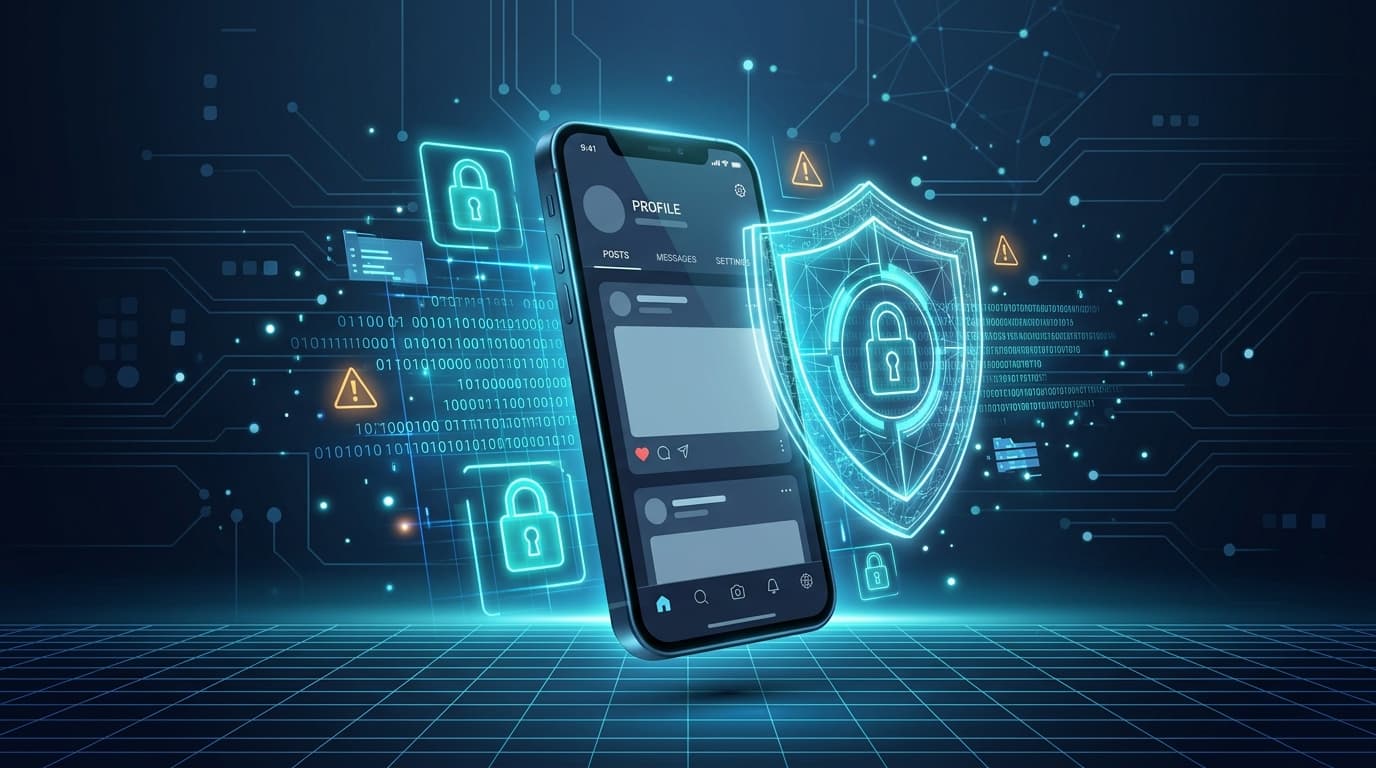
Figure: Multi-layer cybersecurity defense model for social media identity and account assets.
1. Immediate Emergency Response & 1930 Helpline
Speed is your primary defense. If funds were transferred, act within the "Golden Hour" (first 1–2 hours) to maximize the probability of banks locking the money in the recipient's mule account.
Financial Fraud: Dial 1930 (India) or Contact Your Bank Immediately
The National Cyber Crime Helpline (1930) operates 24/7 in India under the Ministry of Home Affairs (I4C). Calling 1930 logs a ticket directly into the Citizen Financial Cyber Fraud Reporting and Management System (CFCFRMS), alerting both your bank and the recipient bank to freeze transactions. Outside India, contact your local bank's fraud division and report to IC3 (USA), Action Fraud (UK), CAFC (Canada), or ReportCyber (Australia).
Account Takeover: Open instagram.com/hacked
If you are locked out of Instagram or an attacker changed your credentials, navigate directly to instagram.com/hacked on your phone browser. Choose "My account was hacked" to trigger identity triage and video selfie biometric recovery.
Check Linked Email for security@mail.instagram.com
When your email or password is changed, Instagram sends a critical reversion alert. Open the email and look for "Revert this change" or "Secure my account". Clicking this within the security window can instantly revoke the hacker's changes.
2. Anatomy of Instagram Fraud & Social Engineering
Instagram is no longer just a photo-sharing app; it is a global commerce, networking, and cultural ecosystem hosting over 2 billion active users. This vast user base makes it a prime target for organized cybercrime syndicates. Unlike traditional software vulnerabilities that break application code, Instagram fraud primarily exploits human psychology—known as social engineering.
Identity & Impersonation
Cloned profiles, stolen identity, fake blue verification badges, and impersonation of friends, family, or official Meta staff.
Financial & Payment Fraud
UPI QR code traps, fake payment screenshots, advance-fee online shopping, fake job offers, and crypto doubling schemes.
Emotional & Extortion Scams
Romance catfishing, video call honeytraps, sextortion, and malicious threats to publish private or deepfake content to contacts.
Technical & Malware Threats
Phishing portals, fake copyright appeals, infected APK downloads, credential harvesting, and remote-access screen sharing.
- UPI & QR Code Inversion: Convincing victims that entering a UPI PIN is required to receive cash prizes or payments.
- Part-Time Task Scams: Small initial payouts (₹200–₹500) to establish psychological trust before demanding heavy prepaid deposits.
- Contest Voting OTP Theft: Weaponizing compromised accounts of friends to extract Instagram password reset codes under the guise of voting.
- Video Call Honeytraps & Morphing: Luring users into brief video calls to record facial footage, immediately followed by extortion threats.
3. Complete Encyclopedia: 24 Instagram Scams & Defense Manual
Every single scam documented below represents active cybercrime techniques identified by security teams and law enforcement agencies. Review the mechanics, scenarios, red flags, and specific recovery steps for each.
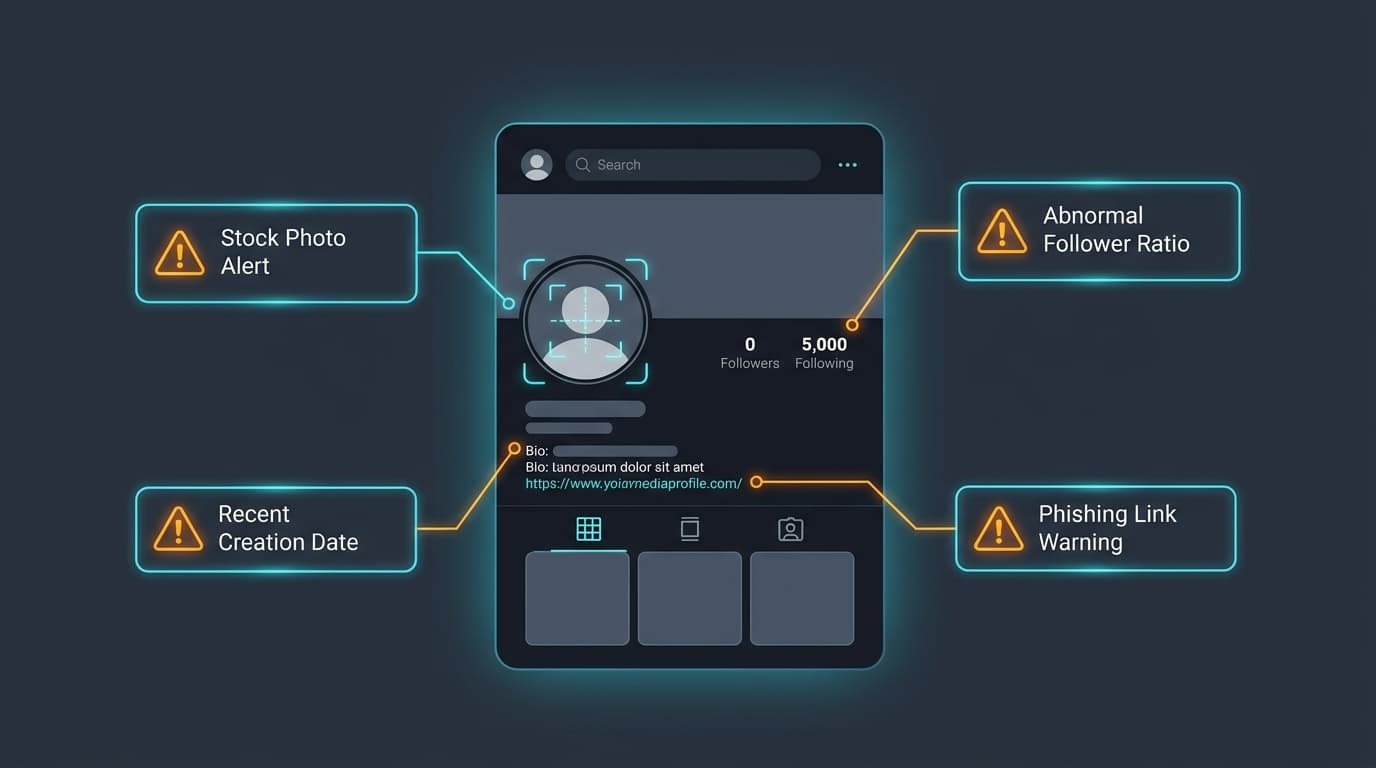
Infographic: Critical visual cues distinguishing authentic accounts from bot and impersonation clones.
Fake Profile & Bot Swarm Scams
- ✕Account created very recently with low post count
- ✕Follows hundreds of people but has very few real followers
- ✕Grammatical anomalies or overly urgent financial pleas
- ✕Bio includes suspicious shortened links (bit.ly, tinyurl)
Tap the three dots on the profile -> "About this account" (where available) to check former usernames and account creation date. Cross-check with your contact via direct phone call or WhatsApp audio.
Never accept follow requests from duplicate profiles of people you already follow without verifying through an external channel.
Report the profile directly to Instagram as "Report -> Something about this account -> It's pretending to be someone I know". Alert your mutual friends in your Stories.
Account Impersonation & Clone Attacks
- ✕Requests for direct bank transfer or UPI instead of official website checkout
- ✕Aggressive push to close the transaction immediately
- ✕Disabled comments or comments filled with bot praises
Compare the exact follower count, earliest post dates, and story highlights. Official businesses maintain consistent external website links.
Keep personal accounts private if not conducting public commerce. Watermark product imagery with your brand handle.
File an Impersonation Report via Instagram's official Intellectual Property / Impersonation form with your government photo ID.
Credential Stuffing & Account Takeover
- ✕Unexpected email from security@mail.instagram.com stating "Email address changed"
- ✕Sudden logout across your mobile apps and browser
- ✕Your profile picture or bio changes without your consent
Check your email inbox for official notifications from security@mail.instagram.com. Inspect active logins in Meta Accounts Center.
Use a unique 16+ character password generated by a password manager. Never reuse passwords across email and social media.
Immediately click "Secure your account" in the Instagram security alert email or visit instagram.com/hacked to trigger video selfie verification.
One-Time Password (OTP) & Help-Me-Vote Scams
- ✕Any request asking you to share a numeric code received via SMS
- ✕The SMS clearly states: "Do not share this code with anyone. Instagram will never ask for it."
- ✕Artificial urgency ("Contest ends in 5 minutes!")
Read the actual text of the SMS. If it originates from Instagram and mentions password reset, login link, or 2FA, it is your personal access token.
Treat SMS OTPs like ATM PINs. Meta employees and genuine friends will NEVER need a code sent to your phone number.
If you just shared the code, immediately open your Instagram app, go to Settings -> Accounts Center -> Password & Security -> Change Password, and tap "Log out of all other sessions".
Phishing Portals & Spoofed Login Pages
- ✕Domain name in URL bar does not end in `instagram.com` or `facebook.com`
- ✕URL uses hyphenated trickery (e.g., `instagram-support-center.com`)
- ✕Page asks for password, phone number, and 2FA backup codes simultaneously
Always inspect the browser address bar. Check SSL certificate details. Legitimate Instagram logins on web will always be on the exact domain `https://www.instagram.com/`.
Never click login links from DMs. Bookmark the official Instagram URL or always navigate via the native mobile app.
Immediately change your Instagram password, reset your email password, enable Authenticator App 2FA, and purge active web sessions.
Fake Verification Badge (Blue Tick) Scams
- ✕Meta never offers verification or handles badge approvals through direct messages
- ✕Urgent deadline warning that the offer will expire
- ✕Form requests your current account password and linked email credentials
Meta Verification is managed exclusively inside the official Instagram app under `Settings -> Accounts Center -> Meta Verified`. Any external web form is fraudulent.
Remember: Real verification never requires you to enter your password on a third-party website.
Change your password immediately, revoke connected third-party app permissions, and report the scammer account.
Fake Copyright Infringement & DMCA Notices
- ✕Copyright notices sent via DM instead of official in-app Support Requests
- ✕Sender account is a regular Instagram user profile disguised with a Meta logo as profile picture
- ✕Shortened or suspicious external appeal URLs
Legitimate Meta copyright notifications appear ONLY under `Settings -> Help -> Support Requests -> Violations` inside the app, or in `Settings -> Accounts Center -> Password and Security -> Recent emails`.
Never click appeal links in DMs. Always verify copyright strikes in your official in-app Support Inbox.
If you clicked the link and entered credentials, immediately change your password and log out all active sessions.
Fake Meta Support & Community Guidelines Threats
- ✕Meta never initiates support disputes or bans via Instagram Direct Messages
- ✕Countdown timer urging action within 12–24 hours
- ✕Account handle has odd combinations of numbers, periods, or underscores
Tap the sender profile. You will see a "Follow" button and standard user statistics, proving it is a regular user account, not Meta.
Block and report the sender profile immediately. Familiarize yourself with the in-app "Account Status" dashboard (`Settings -> Account Status`).
Verify your standing in Settings -> Account Status. If all is green, disregard the message completely.
Giveaway, Lottery & Mystery Box Scams
- ✕Winning a contest you never entered
- ✕Requirement to pay money upfront to receive a prize or gift
- ✕Payment requested via personal UPI VPA (e.g., `rahul892@paytm`)
Legitimate brand giveaways never require winners to pay customs, shipping, or clearance fees upfront.
Adjust your privacy settings to only allow accounts you follow to tag or mention you in posts and stories.
Block the account, report the comment for spam/scam, and never share your home address or bank details.
Fake E-Commerce & Fraudulent Instagram Shops
- ✕Unbelievably low prices ("Too good to be true")
- ✕Only accepting UPI/QR code or direct bank transfer (No Cash-on-Delivery or reputable gateway)
- ✕Comments turned off or heavily restricted on all product posts
- ✕No physical address, GSTIN number, or working telephone number in bio
Search for the brand name on Google with the keyword "scam" or "review". Check if the website domain was registered within the past 30 days using WHOIS lookup.
Insist on Cash-on-Delivery (COD) for unknown shops or buy exclusively through reputable, buyer-protected platforms.
If you paid via UPI, report the transaction immediately on helpline 1930 and file a grievance with your bank citing fraudulent merchant activity.
Cryptocurrency, Forex & "Pig-Butchering" Investment Scams
- ✕Guaranteed high financial returns with zero risk
- ✕Fake testimonials claiming massive profits within hours
- ✕Requests to transfer funds to personal crypto wallets or individual bank accounts
No legitimate investment can legally guarantee fixed astronomical returns. SEBI in India and SEC internationally heavily regulate securities; unregistered social media advisors are illegal.
Never invest money based on recommendations from social media DMs, WhatsApp groups, or Telegram channels.
Stop sending funds immediately. Document all wallet addresses, bank accounts, and chat histories, and file a formal cyber fraud complaint on `cybercrime.gov.in`.
Part-Time "Like Reels & Earn Money" Task Fraud
- ✕Job offers sent via direct messages from unknown accounts
- ✕Unrealistic pay for basic clerical tasks like liking videos
- ✕Transitioning communication to Telegram or WhatsApp
- ✕Requiring the employee to deposit their own money to unlock earnings
Legitimate employment never requires the employee to pay the employer money to work.
Block anyone offering daily-paying part-time jobs for social media likes or product ratings.
Report the beneficiary UPI ID to 1930 immediately. Preserve transaction UTR numbers and report the Telegram group to police cyber cells.
Work-From-Home & Fake Modeling/Casting Scams
- ✕Agencies scouting models via DMs without formal agency representation
- ✕Asking for upfront fees for casting or portfolio processing
- ✕Requests for provocative photos or video auditions in private settings
Legitimate modeling agencies never charge upfront audition fees, and reputable scouts do not ask for intimate photos over Instagram Direct Messages.
Research the agency independently on official business registers. Involve parents or guardians in any commercial opportunity if under 21.
Cease communication immediately. If photos were shared, see Section 9 on Sextortion and evidence preservation.
UPI "Accidental Transfer" & Fake Screenshot Scams
- ✕Sender is panicking and pleading for an instant refund before you can verify your statement
- ✕Bank balance in your official mobile banking app has not increased
- ✕SMS originates from a regular 10-digit mobile number, not your bank's official alpha-numeric sender ID (e.g., `VK-HDFCBK`)
Never trust screenshots or incoming SMS notifications. Always open your bank's mobile app and verify the actual transaction statement and available balance.
Adopt the strict rule: If money did not physically appear in your official bank account statement, no money was received.
Block the caller. If money was accidentally credited through a genuine banking error, instruct them to file an official inter-bank reversal request through their bank branch.
QR Code & Reverse Payment Fraud
- ✕Being told to scan a QR code to receive money
- ✕Any prompt asking for your secret UPI PIN during an incoming payment transaction
- ✕Buyer is in a rush and refuses to use regular bank account numbers or UPI VPAs
The foundational architectural rule of UPI: You NEVER enter your UPI PIN to receive money. Entering a PIN is solely for authorizing a debit from your account.
Never scan a QR code sent by someone else to receive funds. Share only your UPI ID (VPA) or mobile number; payments will credit automatically without any action on your part.
Immediately call 1930 to freeze the fraudster's account. Block your UPI profile in your banking app.
Romance Catfishing & Matrimonial Fraud
- ✕Refusal to ever do live two-way video calls (making excuses about ship satellite connection, military regulations, or broken camera)
- ✕Professing undying love very rapidly within days
- ✕Unsolicited expensive gift parcels held at customs
Perform a Google Reverse Image Search or Yandex Image Search on the profile pictures. Check if the images belong to a known public model or influencer.
Never send money, cryptocurrency, or gift cards to someone you have never met in person in the physical world.
Cut all contact immediately. Report the extortion attempt and beneficiary accounts to the cyber police.
Sextortion, Video Call Traps & Morphing Blackmail
- ✕Sudden, unsolicited requests to move from Instagram DMs to video calls
- ✕The caller immediately starts stripping or displaying sexual content on camera
- ✕Immediate demands for money coupled with screenshots of your follower list
This is an organized criminal extortion syndicate. Paying never stops the blackmail; it guarantees demands for more money.
Never engage in video calls with strangers. Never share intimate photos or videos online. Keep follower lists private.
DO NOT PAY. Preserve screenshots of threats, handles, and payment requests. Block the blackmailer. Report to `cybercrime.gov.in` and call 1930. For photos, register them on TakeItDown.ncmec.org or StopNCII.org to prevent web distribution.
Fake Followers & Growth Service Exploits
- ✕Services requiring your Instagram password to deliver followers or likes
- ✕Offers promising thousands of followers overnight for dirt-cheap rates
- ✕Websites that do not use official Meta OAuth login windows
Meta's Graph API strictly forbids third-party apps from buying followers or automating follows/likes. Any tool promising this violates Meta Terms of Service.
Grow your audience organically through high-quality reels and consistent content. Never give your Instagram password to any growth tool.
Change your password immediately to terminate active session tokens. Open Settings -> Apps and Websites -> Active, and revoke access for all third-party services.
Influencer Brand Collaboration & Malicious PDF Scams
- ✕Brand emails sent from free Gmail/Yahoo addresses or newly registered spoof domains (e.g., `zara-pr-brand.com`)
- ✕Contract files compressed in `.zip`, `.rar`, or `.scr` formats rather than clean cloud documents
- ✕Sender asks you to disable antivirus software to view the document
Inspect the true email sender header. Real enterprise brand teams email from official corporate domains (e.g., `@inditex.com` or `@zara.com`). Scan all attachments with VirusTotal.
Never run executable files sent by prospective sponsors. Open contracts in browser sandboxes like Google Docs.
Disconnect the computer from Wi-Fi immediately. Run a full malware scan using Windows Defender or Malwarebytes. Revoke browser session cookies and reset all passwords from a clean mobile device.
Meta Business Suite & Agency Partner Takeover
- ✕Unsolicited agencies asking for Admin (Full Control) rights instead of Employee or Advertiser rights
- ✕Offers of free advertising credits that require granting business ownership access
- ✕Pressure to approve partner requests inside Meta Business Suite without a contract
Check the role requested inside Meta Business Suite (`business.facebook.com`). Never assign "Admin / Full Control" to third parties. Assign only "Employee" access with specific asset permissions (e.g., "Create Ads" or "View Performance").
Enforce 2FA for all team members in Business Settings. Ensure at least two trusted founders have Admin access so one cannot be stranded.
If compromised, visit `facebook.com/hacked` and submit an official Meta Business Manager Ownership Dispute with legal business registration certificates.
Fake Customer Support Reply & Comment Hijacking
- ✕Support handles replying with zero followers or created that very day
- ✕Providing private mobile numbers or WhatsApp links for corporate customer support
- ✕Asking for UPI PIN, card CVV, or bank login credentials to "process refunds"
Look for the official blue verified badge on the brand handle. Official companies never provide personal 10-digit mobile numbers for customer resolution.
Never share booking PNRs, phone numbers, or ticket details in public comment sections.
Block the fake support account and report the comment. Contact the company exclusively through the verified contact channels on their official website.
Malicious Modded APKs & "Instagram Pro" Downloads
- ✕Downloading apps from third-party links, Telegram groups, or untrusted websites instead of the Google Play Store or Apple App Store
- ✕App prompts for accessibility services, SMS permissions, or screen recording rights
- ✕App requires logging in with your Instagram credentials outside Meta's official interface
Google Play Protect alerts or Android security warnings when attempting to install an unknown package.
Download the Instagram app EXCLUSIVELY from the official Google Play Store or Apple App Store. Never sideload modded social media APKs.
Immediately boot your phone in Safe Mode and uninstall the malicious APK. Change passwords for your Google account, Instagram, and banking apps from a clean secondary device.
AI Voice Cloning & Deepfake Video Impersonation
- ✕Sudden urgent monetary request accompanied by an emotional crisis
- ✕Call or audio message asks to send funds to an unknown third-party UPI or bank account
- ✕The sender refuses or cannot answer a specific shared personal question that only the real person would know
Establish a "Family Safe Word" or challenge question (e.g., "What was the name of our first dog in 2018?"). Call the person back on their registered physical mobile number.
Be cautious about public audio content if you suspect targeted threats. Educate family members about AI voice synthesis capabilities.
Verify physical well-being through friends or campus authorities before sending any funds. Report the deepfake attempt to the National Cyber Crime Portal.
Remote Access & Screen Sharing Fraud
- ✕Anyone requesting you to install AnyDesk, TeamViewer, QuickSupport, or RustDesk
- ✕Anyone asking you to read out a 9-digit remote connection code
- ✕Instructions to open your banking or UPI app while someone is remotely viewing your screen
No legitimate tech support or social media platform will ever ask you to install remote-desktop software on your phone to resolve an account issue.
Never install remote-sharing applications upon the instruction of someone you met online. Never share connection codes.
Turn off your Wi-Fi/mobile data immediately to disconnect the session. Uninstall the remote software. Contact your bank immediately from another device to freeze your accounts.
4. Visual Security Flowcharts & Decision Trees
Interactive Mermaid flow diagrams mapping attack vectors, recovery pathways, and reporting procedures into clear logical decision trees.
Diagram 1: Anatomy of an Instagram Phishing Scam
Visual step-by-step breakdown of how deception vectors bypass user defenses and capture credentials.
Loading security diagram...
Diagram 2: Multi-Layer Instagram Account Defense Architecture
How 5 defense rings combine to create an impenetrable barrier against unauthorized takeover.
Loading security diagram...
Diagram 3: Emergency Hacked Account Recovery Decision Tree
The official step-by-step triage protocol when an account has been compromised or modified.
Loading security diagram...
Diagram 4: Financial Cyber Fraud & 1930 Golden Hour Reporting Process
The official response workflow in India when money has been deducted via UPI or fraudulent bank transfer.
Loading security diagram...
Diagram 5: Suspicious Profile Verification Decision Matrix
How to evaluate whether an unfamiliar account is an authentic person or an impersonation bot.
Loading security diagram...
5. Step-by-Step Instagram Account Hardening Guide
Follow this definitive security procedure inside Meta Accounts Center to build a zero-trust profile that resists credential stuffing, session hijacking, and brute-force intrusions.
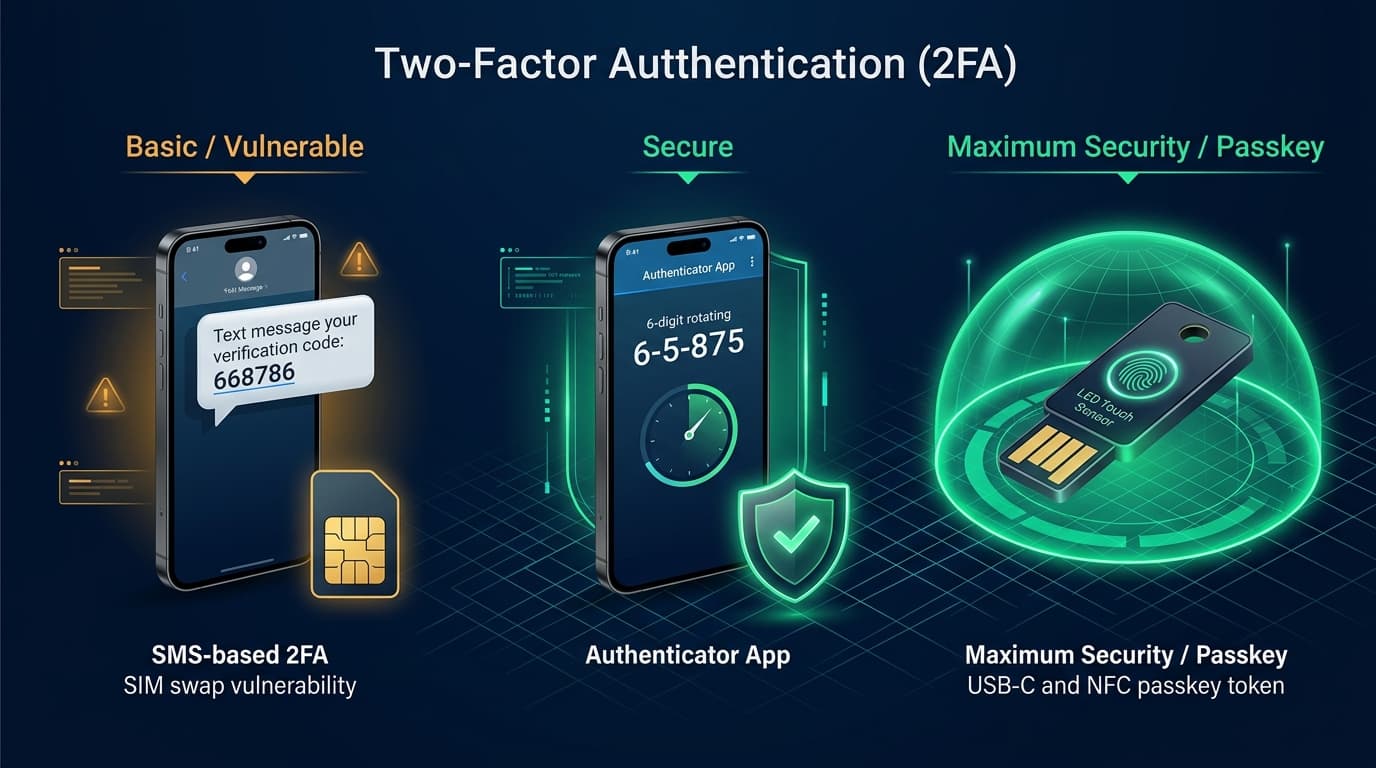
Security Architecture: Why Authenticator Apps and Passkeys outperform vulnerable SMS OTPs.
1. Implement a Unique 16+ Character Password
Use a random passphrase consisting of four unrelated words combined with numbers and special symbols (e.g., `Falcon#Orbit$7829!Velvet`). Never reuse passwords across email, banking, and social accounts.
2. Enable Authenticator App Two-Factor Authentication (2FA)
Navigate to Settings -> Accounts Center -> Password and Security -> Two-Factor Authentication. Choose "Authentication App" (Google Authenticator, Microsoft Authenticator, or 1Password). Scan the QR code. Authenticator apps generate time-based codes offline, immune to SIM swapping.
3. Set Up Passkeys for Phishing-Resistant Biometric Login
Under Password & Security, tap "Passkeys". Passkeys leverage the FIDO2 WebAuthn standard to bind cryptographic keys to your device hardware (Face ID / Touch ID / Windows Hello). Passkeys cannot be phished or intercepted by fake websites.
4. Audit Active Sessions & Disconnect Unrecognized Devices
Visit Password and Security -> "Where you're logged in". Inspect the list of devices, operating systems, and geographical locations. Tap "Select devices to log out" to immediately terminate sessions from unfamiliar cities or old smartphones.
5. Save Offline Emergency Backup Codes
Inside Two-Factor Authentication, open "Additional Methods" -> "Backup codes". Download or write down the five 8-digit emergency recovery codes. If you ever lose your phone or authenticator app, these codes are your only immediate lifeline to regain access.
6. Instagram Privacy Controls & Teen Account Safety
Privacy is your perimeter shield. Configuring granular message filtering, tag controls, and comment safeguards prevents scammers from initiating contact in the first place.
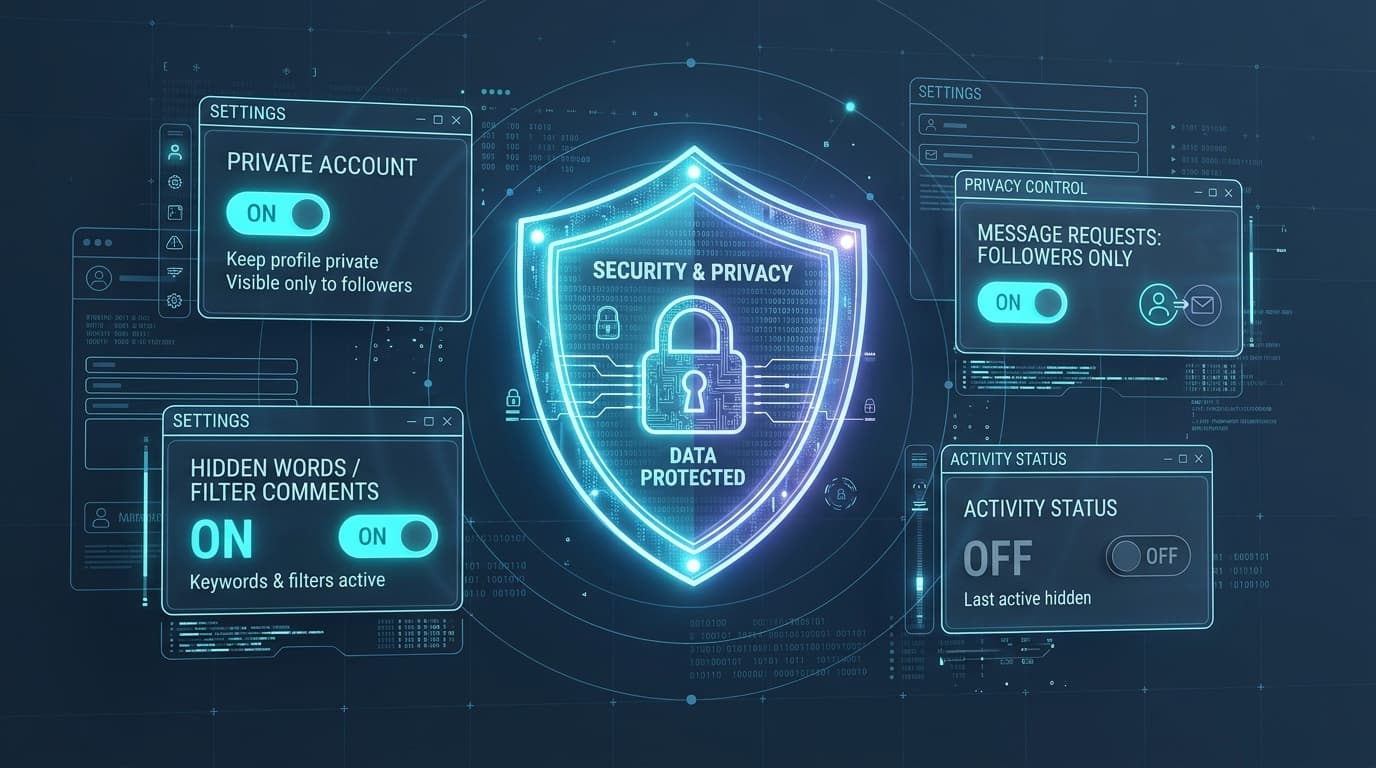
Privacy Matrix: Configure Private Account, Hidden Words, and Message Requests for ironclad defense.
| Setting Feature | What It Does | Recommended Configuration |
|---|---|---|
| Private Account | Hides posts, reels, and stories from non-approved users. | Enable for all personal and student accounts. |
| Message Controls | Determines whether DMs from strangers land in Inbox or Requests. | Set "Others on Instagram" to "Don't receive requests". |
| Hidden Words | Filters offensive comments and spam links using custom word lists. | Turn ON "Advanced comment filtering" and add keywords (e.g. giveaway, crypto, free). |
| Tags and Mentions | Controls who can tag or mention your handle in posts and stories. | Set to "Only allow tags/mentions from people you follow". |
| Activity Status | Broadcasts a green dot indicating when you are active online. | Turn OFF to prevent scammers from monitoring your schedule. |
| Teen Account Protections | Automatic strict defaults for users under 18: private by default, strict messaging. | Built-in automatically by Meta for teens under 18. |
7. Practical Checklist: How to Identify Fake Accounts
No single indicator proves an account is fraudulent. Look for a combination of these digital anomalies before trusting an unfamiliar profile:
- Account Creation Date: Profiles created within the past 14–30 days messaging with urgency are high-risk.
- Former Username Changes: If an account has changed handles 5+ times in 6 months, it was likely hijacked or rebranded for scams.
- Follower-to-Following Asymmetry: Following 4,000+ accounts while having only 30 followers indicates automated spam scripts.
- Stolen / Stock Imagery: Photos appear ultra-professional, cropped from foreign models, or lack authentic candid moments.
- Compressed Upload Timeline: All 15 feed posts were uploaded on the exact same afternoon to simulate an established history.
8. Emergency Recovery Protocol: What to Do If Hacked
If your account is compromised, execute this official recovery procedure immediately. Do not pay third-party "hackers" on Instagram or Twitter claiming they can recover your account—they are advance-fee recovery scammers.
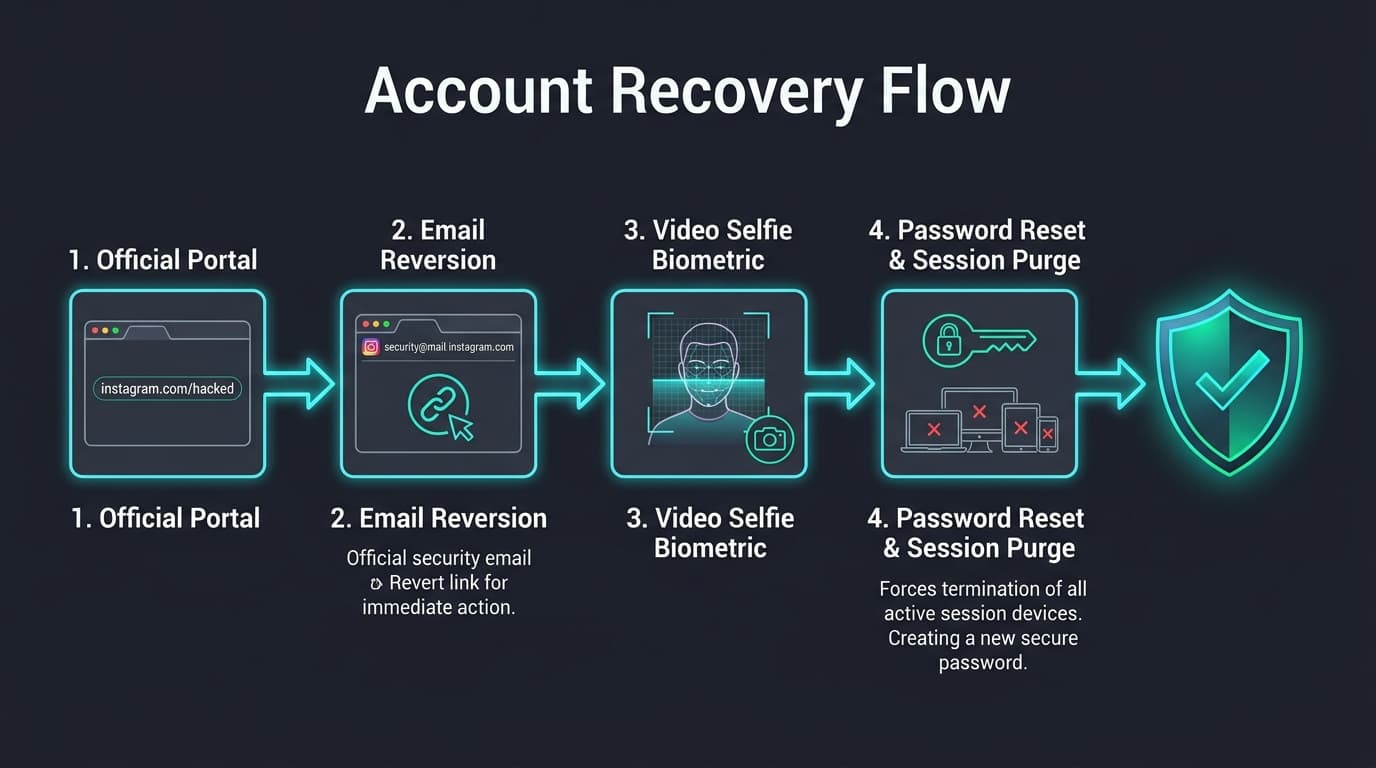
Process Flow: Official Meta triage pipeline from security email reversal to biometric video selfie.
Step 1: Revert Email Changes via security@mail.instagram.com
Search your linked email inbox for messages from security@mail.instagram.com. If the subject reads "Email address changed", tap "Secure my account" or "Revert this change". This cancels the change and sends a login link.
Step 2: Access the Official Triage Portal: instagram.com/hacked
On your mobile browser, go to instagram.com/hacked. Select "My account was hacked". Enter your username or registered phone number. If you no longer have access to the email or phone, tap "Try another way".
Step 3: Biometric Video Selfie Verification
For personal accounts with photos of you, Instagram prompts you to record a short video selfie turning your face in several directions. Meta verifies this against your posted photos within 24–72 hours and emails a secure access link.
Step 4: Immediate Post-Recovery Lockdown
Once back inside: 1) Change your password; 2) Turn ON Authenticator 2FA; 3) Verify your linked email and phone number; 4) Go to "Where you're logged in" and log out all devices; 5) Revoke third-party apps under Apps and Websites.
9. Sextortion & Blackmail Emergency Support Protocol
Cyber extortion is a felony orchestrated by professional criminal syndicates. Experiencing sextortion or deepfake blackmail induces severe panic and isolation, but you are not alone. Do not harm yourself, and never blame yourself.
DO NOT PAY Under Any Circumstances
Paying money never ends the extortion. Extortionists categorize paying victims as compliant cash sources and demand escalating amounts. Refusing payment breaks their leverage.
Preserve Digital Evidence Before Blocking
Take full-screen screenshots showing: 1) The blackmailer's username and profile URL; 2) The exact threat messages with timestamps; 3) Any UPI ID, QR code, bank account, or cryptocurrency address provided for payment. Do not delete the chat.
Proactively Block Image Distribution via TakeItDown & StopNCII
For minors under 18, use TakeItDown.ncmec.org. For adults, use StopNCII.org. These free, privacy-preserving tools generate cryptographic hashes of explicit images locally on your device without uploading the photos, distributing the digital fingerprint to platforms (Meta, TikTok, OnlyFans, X) to automatically block uploads.
Report to National Authorities & Seek Trusted Support
In India, report anonymously or with details on cybercrime.gov.in under "Women & Child Related Crime". In the US, report to FBI IC3 or NCMEC (1-800-843-5678). Confide in a trusted parent, school counselor, or lawyer.
10. What to Do If You Lost Money (1930 & Banking Procedures)
Every second counts during digital financial theft. Follow this structured roadmap to invoke the Citizen Financial Cyber Fraud Reporting and Management System (CFCFRMS) and file formal disputes under Reserve Bank of India (RBI) liability regulations.
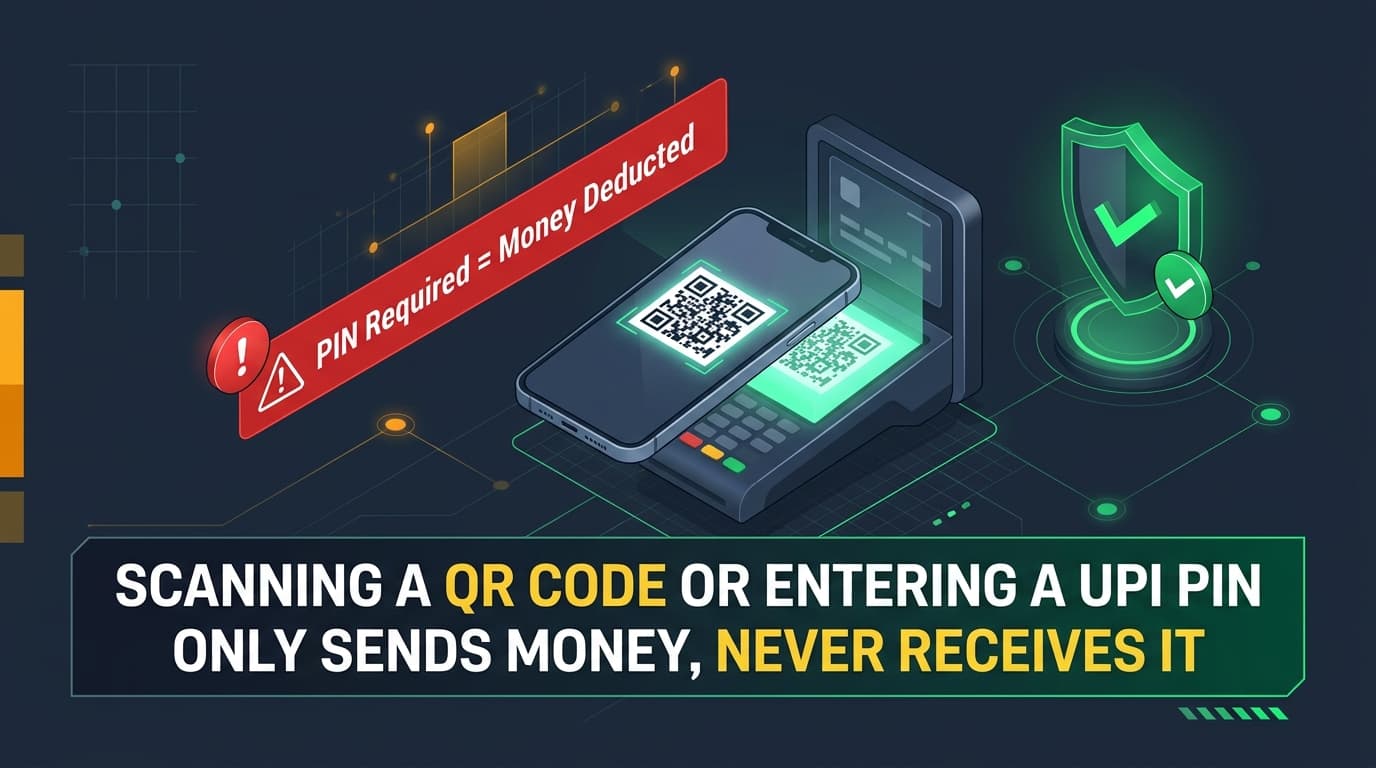
Universal Rule: Entering your UPI PIN or scanning a QR code is exclusively for DEBITING funds from your account.
When cybercriminals steal money via UPI, net banking, or debit card, they route the stolen funds through automated chains of "mule accounts" within 2 to 4 hours before cashing out at ATMs. Reporting to 1930 within the first 1–2 hours allows the CFCFRMS system to send instant debit-freeze requests along the transaction trail, trapping the funds in the banking pipeline.
1. Dial 1930 with Essential Transaction Data Ready
Keep these ready: 1) Your Bank Account/UPI ID; 2) Transaction ID / UTR Number; 3) Exact Date and Timestamp; 4) Debited Amount; 5) Fraudster's UPI ID / Beneficiary Account details. The operator registers a formal CFCFRMS complaint.
2. File a Comprehensive Report on cybercrime.gov.in within 24 Hours
Log in to cybercrime.gov.in. Navigate to "Report Financial Frauds". Enter the acknowledgment number provided during your 1930 call. Upload bank statement PDFs, transaction screenshots, and Instagram chat transcripts.
3. Submit Formal Written Dispute to Your Bank (RBI Guidelines)
Visit your home branch immediately. Submit a written dispute citing Reserve Bank of India circulars on customer liability in unauthorized electronic banking transactions. Request chargeback / reversal investigation and obtain an official stamped acknowledgment.
4. Report Suspect Number on Chakshu Portal (Sanchar Saathi)
Visit sancharsaathi.gov.in and open the "Chakshu" facility to report the scammer's mobile number, WhatsApp account, and SMS headers for suspected telecom and financial cyber fraud, initiating nationwide carrier disconnection.
11. Tailored Safety Playbooks for Specific Audiences
🎓 Students & Teenagers
Keep accounts private. Never share OTPs or contest codes. Beware of task jobs and video call requests from attractive profiles. Never share intimate pictures.
👨👩👧 Parents & Guardians
Use Meta Family Center to supervise teen accounts. Discuss AI voice cloning scams and agree on a secret family verification word. Maintain open, judgment-free communication.
🌟 Influencers & Creators
Never open sponsor contracts compressed in ZIP or RAR files. Keep business inquiry email separate from your Instagram login email. Enable hardware Passkeys.
🛍️ Online Shoppers
Avoid shops offering 80%+ discounts without Cash on Delivery. Never scan a QR code to receive a payment or refund. Check domain age on WHOIS.
12. Meta Business Suite & Agency Access Hardening
Businesses lose access when founders share direct credentials with employees or agencies. Implement role-based governance to safeguard your corporate brand assets.
- Never Share Primary Passwords: Connect Instagram to Meta Business Suite (business.facebook.com) and invite team members by corporate email.
- Assign Least-Privilege Roles: Assign only "Content", "Community Management", or "Ads" permissions. Never grant "Full Control / Admin" to external marketing agencies.
- Enforce 2FA for All Team Members: In Meta Business Settings, set Two-Factor Authentication to "Everyone in the Business Portfolio".
- Instant Employee Offboarding: When a social media manager departs, remove their email from Business Settings in one click, without needing to change passwords.
13. Interactive 10-Point Instagram Security Checklist
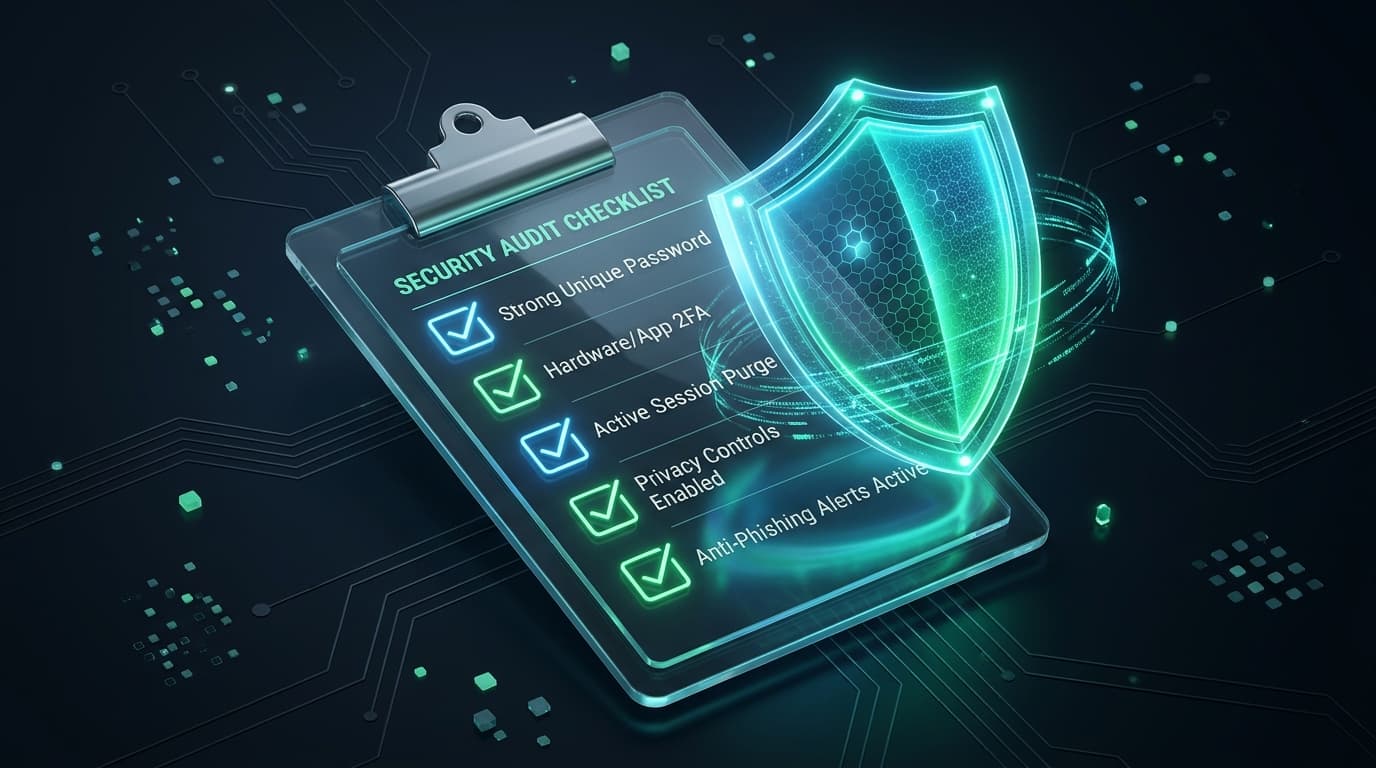
Interactive 10-Point Instagram Security Checklist
Click each security check as you verify it on your Instagram account.
14. Frequently Asked Questions (FAQ)
No. Meta and Instagram official support staff will NEVER send direct messages (DMs) to users regarding security issues, copyright violations, or verification. All authentic security notifications appear under Settings -> Accounts Center -> Password and Security -> Recent emails, or inside the in-app Support Inbox (Settings -> Help -> Support Requests). Any DM claiming to be from Instagram support is a phishing attempt.
15. Verified Official Portals, Helplines & Authorities
| Organization / Portal | Core Function | Official Direct Link |
|---|---|---|
| National Cyber Crime Helpline (India) | Immediate financial cyber fraud freeze & triage (24/7 toll-free) | Dial 1930 |
| National Cyber Crime Reporting Portal (I4C) | Government of India central repository for filing cyber crime FIRs | cybercrime.gov.in ↗ |
| Instagram Official Recovery Portal | Meta automated triage and video selfie recovery for hijacked profiles | instagram.com/hacked ↗ |
| Chakshu Portal (Sanchar Saathi, DoT) | Report fraudulent phone numbers, SMS headers, and WhatsApp accounts | sancharsaathi.gov.in ↗ |
| Take It Down (NCMEC) | Prevent publication of non-consensual explicit images of youth under 18 | takeitdown.ncmec.org ↗ |
| StopNCII (Non-Consensual Intimate Images) | Global cryptographic hashing platform stopping explicit image sharing for adults | stopncii.org ↗ |
| FBI Internet Crime Complaint Center (IC3, USA) | United States federal cybercrime and financial fraud reporting | ic3.gov ↗ |
Enterprise Web & Application Security by Tenzed Technologies
At Tenzed Technologies, we engineer robust digital products, scalable cloud backends, and bulletproof web applications designed from the ground up with Zero Trust principles, cryptographic authentication, and automated threat defense.